Sunday, August 23, 2020

How To Install Windscribe - The Best Free VPN On GNU/Linux Distros?


Why should you use Windscrive?
   Windscribe is well-known for their free VPN service but they also have a paid version. Only with a free account, you will get 10 countries to connect through and change your real IP address and 10GB of free traffic (if you use an email to sign up Windscribe), and unlimited devices.

   The Free version is awesome, but the Pro one is even better! With Pro version you will get Unlimited DataUnblock over 60 Countries and 110 CitiesConfig Generator (OpenVPN, IKEv2, SOCKS5), and full protection from R.O.B.E.R.T.

   For your information, Windscribe is one of the best VPN services in the category Free AuditValue Audit and Overall Audit in BestVPN.com Awards 2019 (Read the White Paper here). You totally can believe in Windscribe (100% no logs).

   And about R.O.B.E.R.T, it's an advanced DNS level blocker that protects you from MalwareAds and TrackersSocial trackingPornGamblingFake NewsClickbait and Cryptominers. Read more about R.O.B.E.R.T.


Anyway, Windscribe helps you:
  • Stop tracking and browse privately: Governments block content based on your location. Corporations track and sell your personal data. Get Windscribe and take back control of your privacy.
  • Unblock geo-restricted content: Windscribe masks your IP address. This gives you unrestricted and private access to entertainment, news sites, and blocked content in over 45 different countries.
  • Take your browsing history to your grave: Protect your browsing history from your network administrator, ISP, or your mom. Windscribe doesn't keep any logs, so your private data stays with you.
  • Stop leaking personal information: Prevent hackers from stealing your data while you use public WIFI and block annoying advertisers from stalking you online.
  • Go beyond basic VPN protection: For comprehensive privacy protection, use our desktop and browser combo (they're both free).

   Windscribe also supports Chrome browser, Firefox browser, Opera browser, Smart TV, Routers, Android, iOS, BlackBerry, Windows OS, Mac OS X and GNU/Linux OS, you name it.

   You can install Windscribe on Ubuntu, Debian, Fedora, CentOS, Arch Linux and their based distros too.

   But to install and safely use Internet through Windscribe, you must sign up an account first. If you already have an account then let's get started.

How to install Windscribe on Arch and Arch-based distros?
   First, open your Terminal.

   For Arch Linux and Arch-based distro users, you can install Windscribe from AUR. Run these commands without root to download and install Windscribe on your Arch:
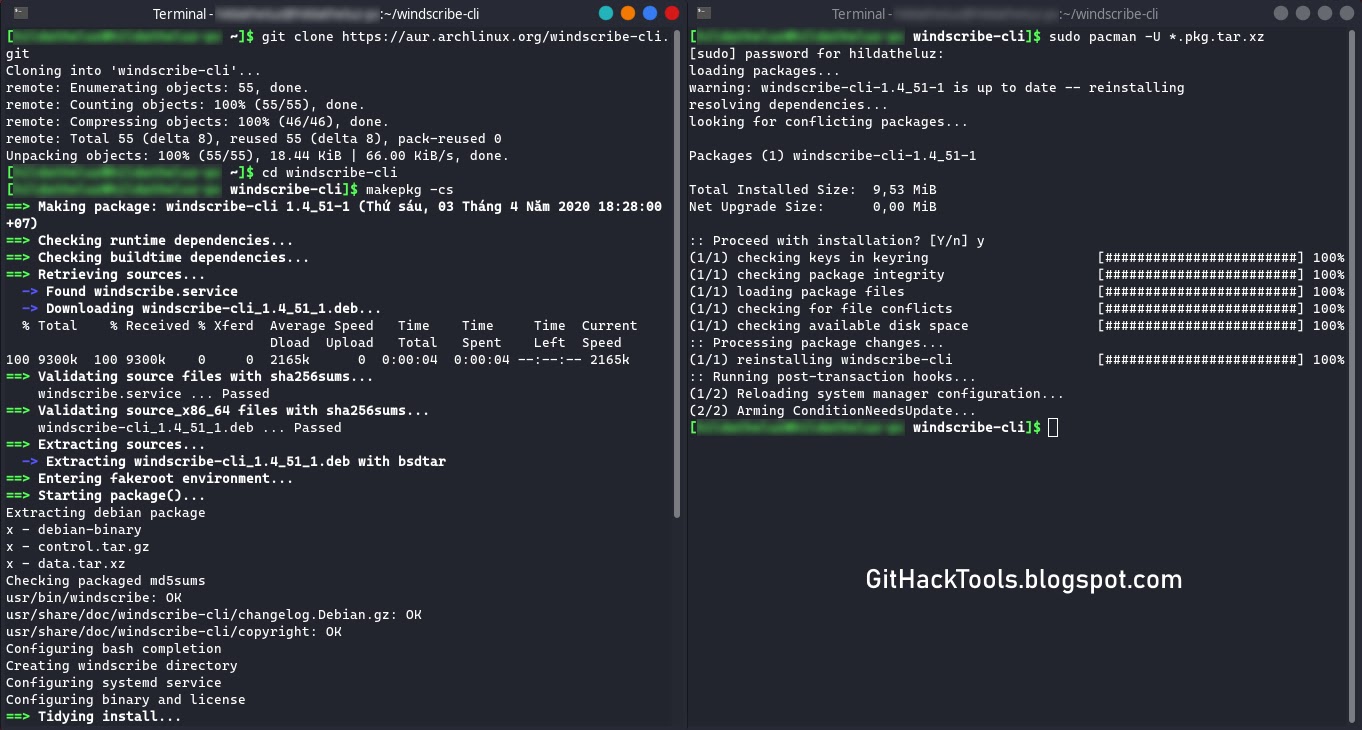

   For other distro users, go to VPN for Linux - Windscribe choose the binary file that compatible with your distro (.DEB for Debian and Ubuntu based, .RPM for Fedora and CentOS based) and then install it.
dpkg -i [Windscribe .DEB package]
rpm -ivh [Windscribe .RPM package]


   Or you can scroll down to Pick Your Distro, click to the distro version you use, or click to the distro version that your distro is based on and follow the instructions.

   Now enter these commands to auto-start a and log in to Windscribe.

   Enter your username and password and then you can enjoy Windscribe's free VPN service.

How to use Windscribe on Linux?
   This is Windscribe list of commands (windscribe --help):
   If you want Windscribe to chooses the best location for you, use windscribe connect best.

   But if you want to choose location yourself, here is the list of Windscribe's locations:
   *Pro only
   Example, i want to connect to "Los Angeles - Dogg", i use windscribe connect Dogg.

   If you want to stop connecting through Windscribe use windscribe disconnect.

   For some reasons, you want to log out Windscribe from your device, use windscribe logout.

I hope this article is helpful for you ðŸ˜ƒ


More articles

Saturday, August 22, 2020

Top System Related Commands In Linux With Descriptive Definitions


Commands are just like an instructions given to a system to do something and display an output for that instruction. So if you don't know how to gave an order to a system to do a task then how it can do while you don't know how to deal with. So commands are really important for Linux users. If you don't have any idea about commands of Linux and definitely you also don't know about the Linux terminal. You cannot explore Linux deeply. Because terminal is the brain of the Linux and you can do everything by using Linux terminal in any Linux distribution. So, if you wanna work over the Linux distro then you should know about the commands as well.
In this blog you will get a content about commands of Linux which are collectively related to the system. That means if you wanna know any kind of information about the system like operating system, kernel release information, reboot history, system host name, ip address of the host, current date and time and many more.

Note:

If you know about the command but you don't have any idea to use it. In this way you just type the command, then space and then type -h or --help or ? to get all the usage information about that particular command like "uname" this command is used for displaying the Linux system information. You don't know how to use it. Just type the command with help parameter like: uname -h or uname --help etc.

uname 

The "uname" is a Linux terminal command responsible of displaying the information about Linux system. This command has different parameter to display a particular part of information like kernel release (uname -r) or all the information displayed by typing only one command (uname -a).

uptime

This command is used to show how long the system has been running and how much load on it at current state of the CPU. This command is very useful when you system slows down or hang etc and you can easily get the info about the load on the CPU with the help of this command.

hostname

The "hostname" is the the command in Linux having different parameters to display the information bout the current host which is running the kernel at that time. If you wanna know about the parameters of hostname command then you just type hostname --help or hostname -h to get all the info about the command and the usage of the command.

last reboot

The "last reboot" is the command in Linux operating system used to display the reboot history. You just have to type this command over the Linux terminal it will display the reboot history of that Linux system.

date

The "date" is the command used in Linux operating system to show the date of the day along with the current time of the day.

cal

The "cal" command in Linux used to display the calendar which has the current date highlighted with a square box along with a current month dates and days just like a real calendar.

w

The "w" is the command used in Linux distro for the sake of getting the information about current user. If you type this command it will display who is online at the time.

whoami

The "whoami" is the command in Linux operating system used to show the information that who you are logged in as. For example if you are logged in as a root then it'll display "root" etc.

finger user

The "finger user" is the command used in Linux distribution to display the information about user which is online currently over that Linux system.

Read more


  1. Pentest Tools For Mac
  2. Hack Tools 2019
  3. Hacker Tools Apk
  4. Hak5 Tools
  5. Hacking Tools For Windows Free Download
  6. Pentest Tools Free
  7. Hacking Tools For Beginners
  8. Hack And Tools
  9. Best Hacking Tools 2019
  10. New Hacker Tools
  11. Hacking Tools For Kali Linux
  12. Hacker Tools Windows
  13. Pentest Tools Github
  14. What Are Hacking Tools
  15. Hacking Tools For Games
  16. Hack Tools Github
  17. Usb Pentest Tools
  18. Usb Pentest Tools
  19. Hack Tools For Mac
  20. Hacking Tools For Windows 7
  21. Hacking Tools Windows
  22. Hack And Tools
  23. Hacking Tools For Windows Free Download
  24. Tools 4 Hack
  25. Hacking Tools Name
  26. Hacker Tools Apk Download
  27. Easy Hack Tools
  28. Computer Hacker
  29. Nsa Hacker Tools
  30. Pentest Tools Android
  31. Hack Tool Apk
  32. Pentest Tools Windows
  33. Tools 4 Hack
  34. Hacking Tools For Games
  35. Hacking Tools For Windows 7
  36. Pentest Tools Open Source
  37. Pentest Tools Bluekeep
  38. Top Pentest Tools
  39. Hack Tools Mac
  40. Pentest Tools Website Vulnerability
  41. Hack And Tools
  42. Hack Apps
  43. Hack Tools
  44. Black Hat Hacker Tools
  45. Pentest Tools Apk
  46. Pentest Tools Windows
  47. Hacking Tools Software
  48. Pentest Tools For Mac
  49. Pentest Recon Tools
  50. Pentest Tools Port Scanner
  51. Hacking Tools And Software
  52. Pentest Tools Find Subdomains
  53. Pentest Tools For Ubuntu
  54. Pentest Reporting Tools
  55. New Hack Tools
  56. Growth Hacker Tools
  57. Pentest Tools Website
  58. What Are Hacking Tools
  59. Pentest Tools Website Vulnerability
  60. Best Pentesting Tools 2018
  61. Hak5 Tools
  62. Hack Tools Github
  63. Android Hack Tools Github
  64. Hacker Tools Apk Download
  65. Pentest Tools Url Fuzzer
  66. Hacking Tools For Games
  67. Game Hacking
  68. Hack Tools For Ubuntu
  69. Hacker
  70. Hacking Tools For Windows 7
  71. Kik Hack Tools
  72. New Hacker Tools
  73. Black Hat Hacker Tools
  74. Beginner Hacker Tools
  75. Pentest Tools For Ubuntu
  76. Pentest Tools Website
  77. Hak5 Tools
  78. Hacker Tools Online
  79. Hacker Hardware Tools
  80. Pentest Tools Free
  81. Tools For Hacker

BurpSuite Introduction & Installation


What is BurpSuite?
Burp Suite is a Java based Web Penetration Testing framework. It has become an industry standard suite of tools used by information security professionals. Burp Suite helps you identify vulnerabilities and verify attack vectors that are affecting web applications. Because of its popularity and breadth as well as depth of features, we have created this useful page as a collection of Burp Suite knowledge and information.

In its simplest form, Burp Suite can be classified as an Interception Proxy. While browsing their target application, a penetration tester can configure their internet browser to route traffic through the Burp Suite proxy server. Burp Suite then acts as a (sort of) Man In The Middle by capturing and analyzing each request to and from the target web application so that they can be analyzed.


Everyone has their favorite security tools, but when it comes to mobile and web applications I've always found myself looking BurpSuite . It always seems to have everything I need and for folks just getting started with web application testing it can be a challenge putting all of the pieces together. I'm just going to go through the installation to paint a good picture of how to get it up quickly.

BurpSuite is freely available with everything you need to get started and when you're ready to cut the leash, the professional version has some handy tools that can make the whole process a little bit easier. I'll also go through how to install FoxyProxy which makes it much easier to change your proxy setup, but we'll get into that a little later.

Requirements and assumptions:

Mozilla Firefox 3.1 or Later Knowledge of Firefox Add-ons and installation The Java Runtime Environment installed

Download BurpSuite from http://portswigger.net/burp/download.htmland make a note of where you save it.

on for Firefox from   https://addons.mozilla.org/en-US/firefox/addon/foxyproxy-standard/


If this is your first time running the JAR file, it may take a minute or two to load, so be patient and wait.


Video for setup and installation.


You need to install compatible version of java , So that you can run BurpSuite.
Related links

  1. Hacker Tools For Ios
  2. Hacking Tools Hardware
  3. Pentest Tools Github
  4. Pentest Tools Github
  5. Hack Tools Download
  6. Hacking Tools For Mac
  7. Pentest Tools List
  8. Hack Tools For Windows
  9. Pentest Tools Review
  10. Hacker Tools
  11. Pentest Tools Url Fuzzer
  12. Hacker Tools Apk Download
  13. Hacker Tools List
  14. Best Pentesting Tools 2018
  15. Hacker Tools For Mac
  16. Hacker Tools Apk Download
  17. Hack And Tools
  18. Hacker Tools Online
  19. Hack Tools For Ubuntu
  20. Hackrf Tools
  21. Pentest Tools Free
  22. Best Hacking Tools 2019
  23. Hack Tools 2019
  24. Hack Rom Tools
  25. Hack Tools Github
  26. Pentest Tools For Mac
  27. Pentest Tools For Mac
  28. Hacker Tool Kit
  29. Free Pentest Tools For Windows
  30. Pentest Tools
  31. Black Hat Hacker Tools
  32. Hack Tools For Games
  33. Hacker Tools 2019
  34. What Are Hacking Tools
  35. Pentest Tools Framework
  36. Pentest Tools For Mac
  37. How To Make Hacking Tools
  38. New Hack Tools
  39. Hacking Tools For Windows
  40. Hacker Tools List
  41. Beginner Hacker Tools
  42. How To Make Hacking Tools
  43. Pentest Tools Nmap
  44. Hacker Tools 2020
  45. Growth Hacker Tools
  46. Underground Hacker Sites
  47. Hack Tools
  48. Pentest Tools Tcp Port Scanner
  49. Hacker Tool Kit
  50. Pentest Tools For Windows
  51. Beginner Hacker Tools
  52. Hack Tools For Mac
  53. Underground Hacker Sites
  54. Computer Hacker
  55. Blackhat Hacker Tools
  56. Hacker Tools For Ios
  57. Hack Tools Mac
  58. Pentest Tools Kali Linux
  59. Install Pentest Tools Ubuntu
  60. Hacking Tools And Software
  61. Bluetooth Hacking Tools Kali
  62. Kik Hack Tools
  63. New Hack Tools
  64. Pentest Tools Free
  65. Hacking Tools Online
  66. Hacking Tools For Mac
  67. Hacker Tools Online
  68. Pentest Tools Find Subdomains
  69. World No 1 Hacker Software
  70. Hack Apps
  71. Pentest Tools Nmap
  72. Hacking Tools Mac
  73. Nsa Hack Tools Download
  74. Hack And Tools
  75. Nsa Hacker Tools
  76. Bluetooth Hacking Tools Kali
  77. Hacking Tools Kit
  78. Hacking Tools Pc
  79. How To Make Hacking Tools
  80. Blackhat Hacker Tools
  81. Android Hack Tools Github
  82. Best Pentesting Tools 2018
  83. What Is Hacking Tools
  84. Hack Tools
  85. Pentest Tools Github
  86. Pentest Tools Online
  87. Hacker Tools List
  88. Hacking Tools 2020
  89. Best Pentesting Tools 2018

Goddi (Go Dump Domain Info) - Dumps Active Directory Domain Information


Based on work from Scott Sutherland (@_nullbind), Antti Rantasaari, Eric Gruber (@egru), Will Schroeder (@harmj0y), and the PowerView authors.

Install
Use the executables in the releases section. If you want to build it yourself, make sure that your go environment is setup according to the Go setup doc. The goddi package also uses the below package.
go get gopkg.in/ldap.v2

Windows
Tested on Windows 10 and 8.1 (go1.10 windows/amd64).

Linux
Tested on Kali Linux (go1.10 linux/amd64).
  • umount, mount, and cifs-utils need to be installed for mapping a share for GetGPP
apt-get update
apt-get install -y mount cifs-utils
  • make sure nothing is mounted at /mnt/goddi/
  • make sure to run with sudo

Run
When run, will default to using TLS (tls.Client method) over 636. On Linux, make sure to run with sudo.
  • username: Target user. Required parameter.
  • password: Target user's password. Required parameter.
  • domain: Full domain name. Required parameter.
  • dc: DC to target. Can be either an IP or full hostname. Required parameter.
  • startTLS: Use to StartTLS over 389.
  • unsafe: Use for a plaintext connection.
PS C:\Users\Administrator\Desktop> .\godditest-windows-amd64.exe -username=testuser -password="testpass!" -domain="test.local" -dc="dc.test.local" -unsafe
[i] Begin PLAINTEXT LDAP connection to 'dc.test.local'...
[i] PLAINTEXT LDAP connection to 'dc.test.local' successful...
[i] Begin BIND...
[i] BIND with 'testuser' successful...
[i] Begin dump domain info...
[i] Domain Trusts: 1 found
[i] Domain Controllers: 1 found
[i] Users: 12 found
[*] Warning: keyword 'pass' found!
[*] Warning: keyword 'fall' found!
[i] Domain Admins: 4 users found
[i] Enterprise Admins: 1 users found
[i] Forest Admins: 0 users found
[i] Locked Users: 0 found
[i] Disabled Users: 2 found
[i] Groups: 45 found
[i] Domain Sites: 1 found
[i] Domain Subnets: 0 found
[i] Domain Computers: 17 found
[i] Deligated Users: 0 found
[i] Users with passwords not set to expire: 6 found
[i] Machine Accounts with passwords older than 45 days: 18 found
[i] Domain OUs: 8 found
[i] Domain Account Policy found
[i] Domain GPOs: 7 found
[i] FSMO Roles: 3 found
[i] SPNs: 122 found
[i] LAPS passwords: 0 found
[i] GPP enumeration starting. This can take a bit...
[i] GPP passwords: 7 found
[i] CSVs written to 'csv' directory in C:\Users\Administrator\Desktop
[i] Execution took 1.4217256s...
[i] Exiting...

Functionality
StartTLS and TLS (tls.Client func) connections supported. Connections over TLS are default. All output goes to CSVs and are created in /csv/ in the current working directory. Dumps:
  • Domain users. Also searches Description for keywords and prints to a seperate csv ex. "Password" was found in the domain user description.
  • Users in priveleged user groups (DA, EA, FA).
  • Users with passwords not set to expire.
  • User accounts that have been locked or disabled.
  • Machine accounts with passwords older than 45 days.
  • Domain Computers.
  • Domain Controllers.
  • Sites and Subnets.
  • SPNs and includes csv flag if domain admin (a flag to note SPNs that are DAs in the SPN CSV output).
  • Trusted domain relationships.
  • Domain Groups.
  • Domain OUs.
  • Domain Account Policy.
  • Domain deligation users.
  • Domain GPOs.
  • Domain FSMO roles.
  • LAPS passwords.
  • GPP passwords. On Windows, defaults to mapping Q. If used, will try another mapping until success R, S, etc... On Linux, /mnt/goddi is used.


More info


Friday, August 21, 2020

Fragroute


"fragroute intercepts, modifies, and rewrites egress traffic destined for a specified host, implementing most of the attacks described in the Secure Networks "Insertion, Evasion, and Denial of Service: Eluding Network Intrusion Detection" paper of January 1998. It features a simple ruleset language to delay, duplicate, drop, fragment, overlap, print, reorder, segment, source-route, or otherwise monkey with all outbound packets destined for a target host, with minimal support for randomized or probabilistic behaviour. This tool was written in good faith to aid in the testing of network intrusion detection systems, firewalls, and basic TCP/IP stack behaviour." read more...

Website: http://monkey.org/~dugsong/fragroute

Related posts